Logs Overview
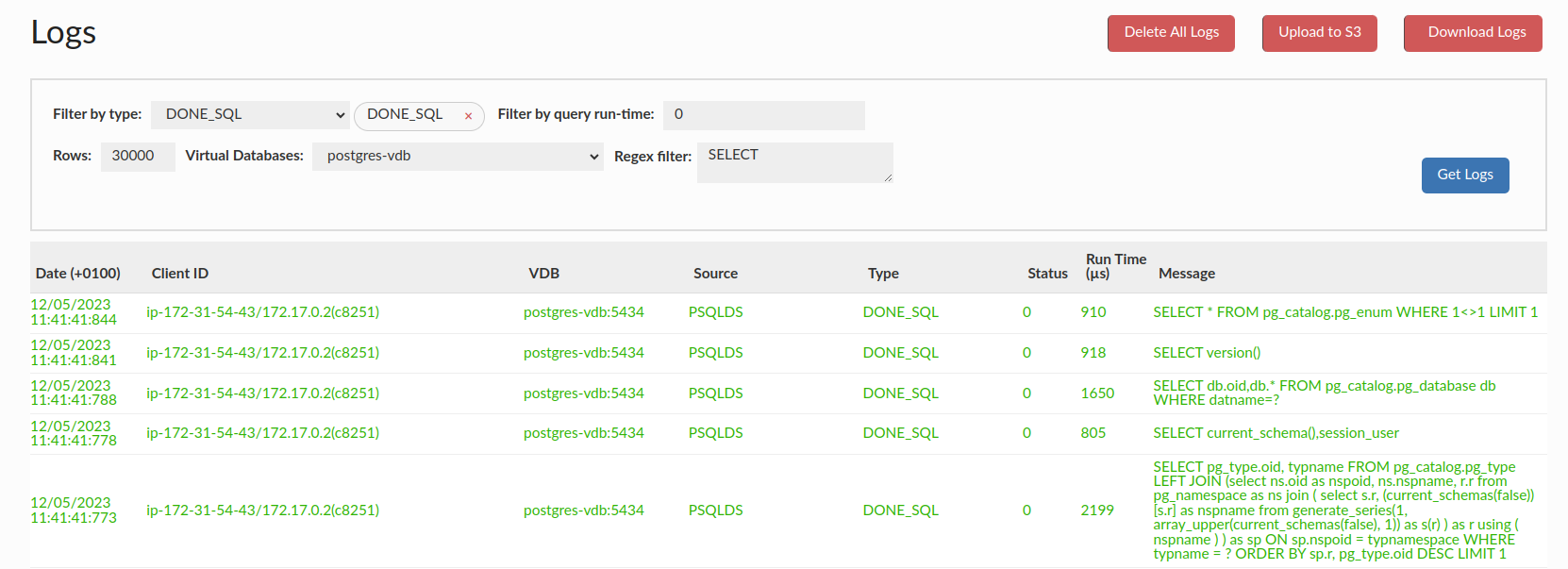
The Logs tab is provided to allow inspection of the actual detailed logs being processed by the system. The table contains the following columns:
- Date(with timezone indicator): Date and time of the log entry.
- Client ID: The ID of the client that generated the log entry.
- VDB: The VDB name (if any) the log is associated with. The 'manager' value is used for the Central Manager log.
- Source: The Data Source name (if any) the log is associated with. The 'none' value is used for the Central Manager log.
- Type: A log type. All log types are described below.
- Status: An integer field to indicate if a query was in various states. All status flag types are described here.
- Run Time: The time (if any) the log is associated with.
- Message: The actual message contained in the log entry.
Log download
Using the Download Logs button will download a zip archive with the following content:
- Files from the log directory. Includes:
- log files,
- screenshots,
- secret files used for decryption of TLS packet captures.
- Enabled VDB configuration files.
- Systemd logs of "run as service" proxies, from journald.
- Database system variables from each enabled data source.
- Packet capture files.
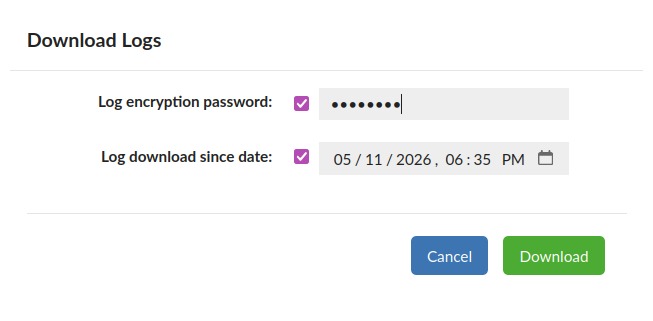
Additional options (optional):
- Log encryption password: When supplied, the files from the above content will require this password to open.
- Log download since date: Download logs since this date. By default, only logs from the last 7 days will be downloaded.
Filtering options
- Filter by type: This option allows you to filter logs by type. All log types are described below.
- Filter by query run-time: Filter the logs by their run time
- Rows: Number of rows to limit to when searching for logs
- Virtual Databases: Allows you to choose to display logs only from the selected VDB
- Regex filter: Allows you to filter log messages by regex. Note: If not empty, only messages matched this regex will be shown
Log types
The Filter by type at the top of the Logs section allows us to filter generated logs depending on what they are related to. The available log types:
- ALERT: Generated when the top red alert is triggered. For VDB and Central Manager generated by default.
- AUTHENTICATION: Generated on the user authentication attempt. For VDB, the Log Authentications option has to be enabled. For Central Manager generated by default on successful auth only. More information in the Login History tab.
- CONNECTION_CLOSE: Generated each time any connection is closed. Only for VDB, the Log Connections option has to be enabled.
- CONNECTION_OPEN: Generated each time a new connection is established. Only for VDB, the Log Connections option has to be enabled.
- CONNECTION_HANDSHAKE_TRACE: Generated each time a new connection is established, this traces the full handshake process. Includes network negotiation and authentication steps. Only for VDB, the Verbose Debug Mode and the Connection Handshake Tracing options have to be enabled.
- CONSOLELOG: The most basic type of log in Heimdall. For VDB, the Aggregate Console Logs option has to be enabled. For the Central manager enabled by default. Note: For Local Proxy generated by default.
- DEBUG: Provides additional logs generated in rare cases. For VDB, the Verbose Debug Mode option has to be enabled. For Central Manager, the Verbose Debug Mode option has to be enabled.
- DONE_SQL: Generated each time any query goes through proxy. Only for VDB, the Log All SQL option has to be enabled.
- DONE_SQL_PORTAL: Generated each time any query executed by an ephemeral portal user goes through proxy. Only for VDB, the Log All Portal Sessions SQL option has to be enabled.
- ERROR: Generated when something unexpected or unwanted happened, but no exception was thrown. For VDB and Central Manager generated by default.
- EVALUATION_PLAN: Generated with rule extract plan actions.
- INTERNAL_EXCEPTION: Generated when any other exception is thrown. For VDB and Central Manager generated by default.
- HEART_BEAT: One log per second contains proxy statistics information. Only for VDB, generated by default. Note: On GUI there is no HEART_BEAT option to reduce the number of records. They are only stored in the Log Database.
- METHOD_COMPLETE: Generated each time the non-resultset JDBC method is called. Only for VDB, the Log Methods option has to be enabled.
- METRICS_DISCOVERY: Generated for JMX statistics propagation between central manager and proxy.
- NEW_PATTERN: Generated when observing a new query pattern. Only for VDB, the Learn Pattern rule action has to be set.
- NOCACHE: Generated when cache revalidation fails. Only for VDB, the Cache rule action with revalidateOnly parameter has to be set.
- NOTIFY: Generated for rules tagged with a notify parameter.
- TRACE: Generated with rule trace actions.
- TRANSACTION_START: Generated each time the transaction is started. Only for VDB, the Verbose Debug Mode option has to be enabled.
- TRANSACTION_END: Generated each time the transaction is committed or rollback. Only for VDB, the Verbose Debug Mode option has to be enabled.
- TRANSACTION_SET: Generated each time the transaction is started with non-default settings. Only for VDB, the Verbose Debug Mode option has to be enabled.
- TRIGGER: Generated with rule trigger actions.
- PROXY_START: Generated each time any proxy is started/restarted. Only for VDB generated by default.
- READ_ONLY_SET: Generated each time a transaction is explicitly marked as a READ ONLY. Only for VDB, the Verbose Debug Mode option has to be enabled.
- SQL_EXCEPTION: Generated each time SQLException is thrown. For VDB and Central Manager generated by default.
- SYSTEM_INFO: Generated for Heap Dumps and Stack Traces. For VDB and Central Manager generated by default.
Status flag types
- 0: Cache miss
- 1: Cache hit
- 2: Cache miss (in transaction)
- 3: Cache hit (in transaction)
- 5: Forwarded
- 6: Forwarded (in transaction)
Log File Rotation
When a log file is rotated, as controlled by settings in the Log Server Properties it will execute a command (if present) named rotatelog.sh. A basic example would be:
#!/bin/bash

tar cvzf $1.tgz $1
This command can execute other code, such as to transfer the file to S3 or another location. Please note that on a restart, there is no guarantee that a file will be rotated, so periodic cleanup may be needed.