Rule Overview
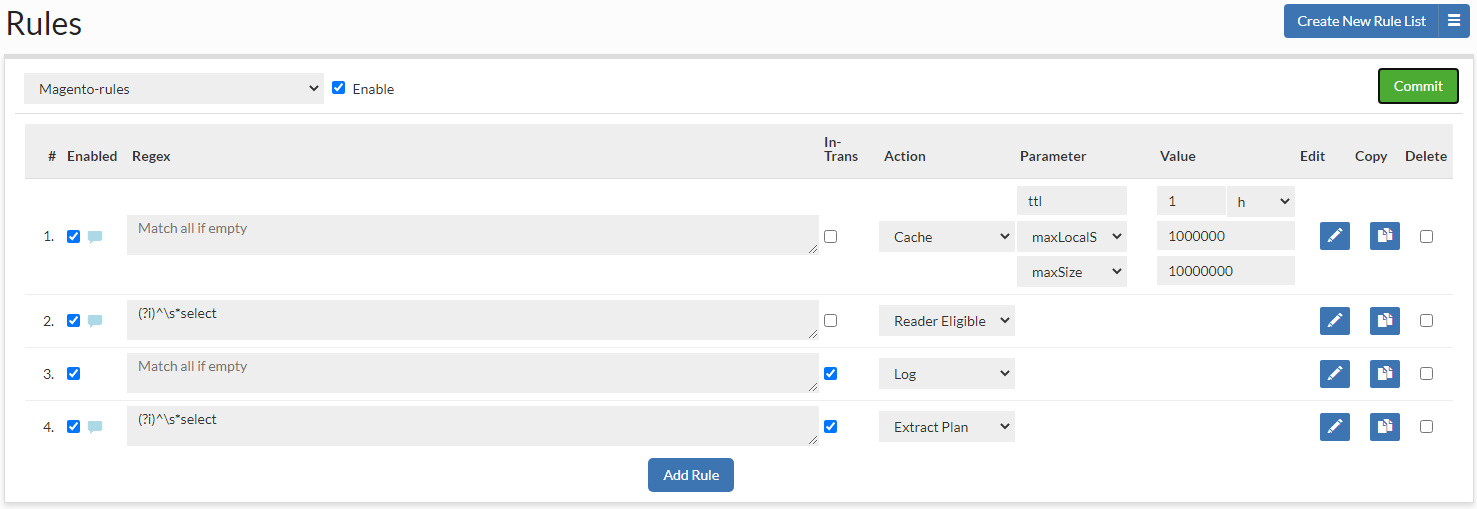
A rule list is a set of rules that is processed in order on queries, and dictates the processing done on a particular query and its response. A rule is composed of several components:
- #: A current row indicator (for moving rows) and the index of the rule.
- Enabled: If the rule is enabled. Non-enabled rules will not be processed.
- Note Indicator: When a note is attached to a rule, an icon will be visible, and the note can be viewed by hovering the mouse over the icon
- Regular Expression: See below for regular expression behavior
- In-Trans Flag: This specifies if a rule should operate also on a queries that are in the middle of a transaction, i.e. it is not in auto-commit mode in an explicit transactional context (between "Start Transaction" and "commit" or "rollback")
- Action: What action should be taken on a regex match
- Parameter: A parameter that modifies the behavior of the action
- Value: The value of the parameter, e.g. to specify the maximum time to live for a cache rule
- Edit: An icon to provide an expanded view of the rule, and to allow editing of comments
- Copy Allows copying existing rule - it will show as new rule with copied rule options.
- Delete: Toggle deletion of a rule on the next commit
To re-order a rule, it can simply be dragged into place in the desired order.
Hint: To better edit a rule, make sure to use the pencil icon to open up the expanded window, which provides more editing options.
Regular Expression Field Behavior
Each rule has a field that can contain either a re2j 1.1 (https://github.com/google/re2j) regular expression, or an extended specifier (below). The re2j regular expression language is nearly identical to normal Java regular expressions, except that it can operate in linear time, while Java regular expressions may end up being unbounded in time. As a tradeoff, certain features dependent on backtracking are removed.
Examples of some simple regular expressions:
- "(?i)^select" Case insensitive match all queries that start with "select" at the start of the line
- "(?i)somestring" Case insensitive match queries with the string "sometable" anywhere in the query
In addition to regular expressions, the following extended specifiers can be used instead:
- literals:{string1},{string2}..., to match any one string literal in a list.
- tables:{table1},{table2}..., to match any one table in the named list.
- tablesall:{table1},{table2}..., match only if all the tables in the list are present in the query tables.
- tablesonly:{table1},{table2}..., match only if all the tables in the query tables are in the list present (but all do not need to be).
- tablesexactly:{table1},{table2}..., match only if every table in the list is present in the query tables, and no other tables are present, i.e. an exact match between table lists.
- tablescontain:{substring1},{substring}..., match if any table contains any of the exact strings (no regex processing)
- users:{user1},{user2}..., match if the query's uses matches one of the users in the list (as regex).
- ldapgroups:{group1},{group1}..., It is an intersection of defined in the rule 'ldapgroups' value and extracted ldap groups of authenticated user. When at least one group matches, then the rule is applied (supports regex).
- catalog:{catalog1},{catalog2}..., match if the query catalog matches any catalog in the list (as regex)
- catalogprefix:{prefix1},{prefix2}..., match if the query catalog starts with any string in the list
- appname:{application_name1},{application_name2}..., match if the postgres application name matches (as regex)
- ports:{port1},{port2}..., match the port the query was received on, via the vdb. This allows multiple ports to be used on the vdb, and have a different behavior based on which port was used.
- ips:{ip1},{ip2}..., match the IP the query was received from, via the vdb. Subnet matching is not currently supported. If complex IP based rules are desired, it is suggested that an additional port be added to the proxy, the ports qualifier be used, and firewall rules can be used to control what IP ranges have access to this new port with the desired configured behaviors.
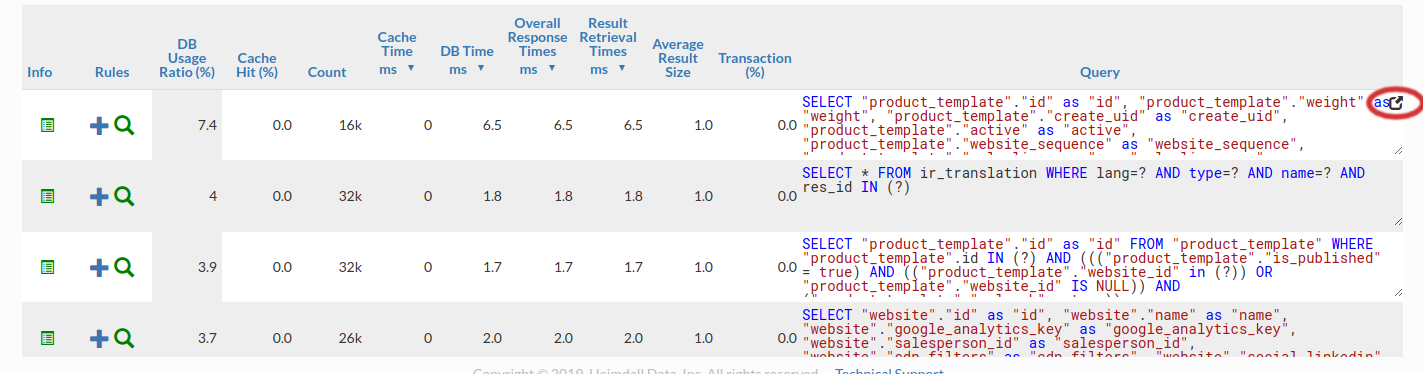
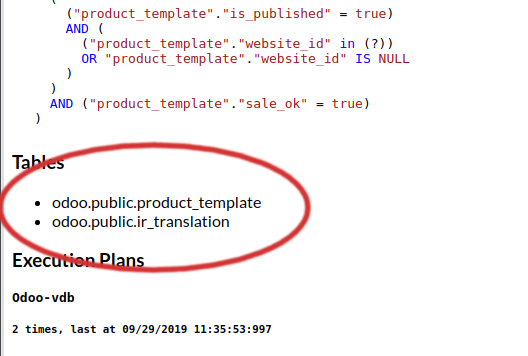
Note for extended specifiers: The fully qualified catalog.table name is expected, so if using the "magento" database with a table of "users", you would match against "magento.users". Please note the dynamic parameters below for substitutions that are supported here as well. To verify that the table name is as expected, use the "printtable" option, view the query in the expanded analytics tab, or use the debug option to view the fully qualified table name as used internally. Alternatively, use the "expanded query view" in the analytics, and then scroll down to the table names:
To open the expanded query view:
And to view the fully-qualified table names, in the expanded view, scroll down to the tables section before any query plans:
Additionally, you can use the string "${catalog}" to match the current connections catalog in processing a rule, so as to allow matching on multiple catalogs as appropriate.
Examples of some extended regular expressions:
- "tables:magento.core_store" to match on the table magento.core_store only, but any other table may exist as well
- "tables:${catalog}.core_store" to match on the table core_store only, but in any catalog, not just the magento catalog
- "tablesexactly:magento.core_store" to match on the table magento.core_store only, and no other tables are in the query
When using the expanded rule view, it is possible to add more than one regex field to a rule, and then specify if AND or OR logic should be used to connect them. This allows for example, one to specify a tables: specifier, then to filter say INSERT, UPDATES or DELETES only against that table.
Rule Processing Behavior
All rules are processed in order of evaluation. This means that a rule that matches earlier in processing can be overridden later in processing by the same rule type.
In order to process a rule, the following steps are taken:
- Check if rule list is enabled
- Iterate through rules
- Check if a rule is enabled
- Check if the in-transaction flag is set when in a transaction
- Check if the rule type should be excluded for processing, due to a previous ignore rule
- Check if the regular expression matches (see below)
- Process the capture parameter, if set, for dynamic parameters
- Check if the rule rate matching limits are allowed
- Process the update, printmatch, printtables, tables, and notify flags (although no action is taken at this point)
- Process the rate limiting parameters (except delay) this is done only once, after caching, async and forwarding are executed)
- Per-action rule processing
Note: In the case of multiple Allow rules in consecutive order, the rules internally will self-organize based on the frequency of hits observed by the driver. The more often a rule has been hit, the further up the list it will be positioned to optimize the regex lookup performance. Any other type of rule will be processed in the order specified, and no Allow rule will optimize around another other rule type.
Special case: The nocache rule behaves as both a "cache with a ttl of 0" and "ignore all other cache rules following", i.e. it prevents all past and future cache rules from impacting the query. Most rules can be overridden, but for safety, the nocache rule can not be overridden once it matches a particular pattern.
Rule Flow Control And Dynamic Parameters
Several actions and properties can be used to control the processing of rules for more advanced applications:
- Ignore Action: When an ignore action is specified, the name of an action type can be specified. Any rule matching that action type will be ignored in any further processing of the matching query. This can be used to create exclusions where a particular action shouldn't be taken, but creating a regular expression to account for this would be difficult.
- Call Action: A call can be used to call by name a nested rule-list, to allow one rule-list to be called from another rule-list. This can be leveraged to provide a common set of rules for an application, but custom behaviors for particular instances. Another use case is to use a single regular expression match to apply multiple actions to a given set of content, as in the called rule, an empty regex can be used.
- Stop Parameter: When specified on a matching rule, no further processing will occur in the current rule-list for the given query. If in a nested rule-list due to a Call action, the calling rule-list will continue to be processed.
- Capture Parameter: This parameter triggers dynamic property evaluation. When set, regular expression capture groups are used to edit the parameter values for the query, in order to dynamically adjust behavior. A common use would be to include a comment at the front of a query, and then use the value in the comment part of or a parameter's value, for example, to dynamically set the TTL of a query based on the comment's included value: Example:
    Regex:  /\* ttl=(.*) \*/

    Action:  Cache, ttl=${1}

    Query:  /* ttl=30000 */ SELECT * from Table

    Result:  The query would be cached for 30 seconds

    Note: For more parameters, you can use "Regex:  /\* param1=(.*) param2=(.*) \*/" with "Action:  Cache, param1=${1}, param2=${2}"
Note: To use this feature, you have to enable the "honorComments" parameter. More in the Request Rules section.
Internal Regexes
Similar to the capture parameter based on regular expression capture groups, some built-in strings have special meaning in properties, and will be replaced with the internal values during rule processing:
- ${catalog} or ${database}: the current catalog/(database in MySQL term) being used.
- ${vdb}: The VDB the traffic was received on
- ${user}: The JDBC user on a connection
- ${connid}: The connection ID of the front-end connection the query was issued on
Note: These variables can be used when using the extended table matching syntax, such as "tables:${catalog}.tablename" to avoid having to specify the actual catalog to match against. There is no need to specify the "capture" parameter for these to operate in this context. This works in both request rules and response rules.
Rate Limiting
Often, such as in the case of a "Log" rule action, it is desirable to limit the rate that a particular rule is matched to an absolute number. Each rule has several options that can be used for this:
- matchlimit: Enforces a rate of X pattern matches, with up to Y seconds of burst. To specify the burst value, use the parameter "maxburst". Useful to limit the amount of log data generated in a similar manner to using the sample parameter.
- maxburst: Specify the number of seconds of bursting that is allowed before clamping the rate for the ratelimit or matchlimit parameters. Defaults to 10.
- ratelimitname: Specify a "rate limit" control token name for limiting. This can be a dynamic value for say ${catalog} or ${user} to limit rate by various metadata.
- concurrency: Specify the number of parallel queries at a time that can be executed. The lock will be released after the the "execution" is complete, i.e. after the initial data is received, but not necessarily after all the data has been transmitted by the database;
- concurrencyname: Name the token for tracking of concurrency.
Another case is that a rule should be evaluated only a certain percentage of the time, say 1 out of 10. The following parameters can be used for this:
- exclude: A ratio of queries should NOT match the policy, as expressed as 1/X. Useful to allow a small number of objects that would otherwise be a cache hit to be a cache miss instead. Example: A value of 10 would exclude 1 out of every 10 matches from actually matching the rule.
- sample: A ratio of queries should match the policy, as expressed as 1/X. Useful to limit logging to a small percentage of traffic. Example: A value of 10 would mean that 1 out of 10 matches would be treated as a match.
A final case is where queries matching a rule should themselves be slowed down, say to help prevent an outage of all traffic due to a DoS attack. The following parameters can be used in such cases:
- delay: When a rule with a delay flag matches, induce a delay in processing. Useful to determine if a rule can have an overall impact on performance, i.e. if a delay doesn't make a noticeable difference, then caching won't either. Also useful in inducing delays to determine if moving the database further away will impact performance significantly. This delay will occur only if the query is requested from the database, i.e. it will not impact a cached query.
- ratelimit: Enforces a rate of X queries per second, with up to Y seconds of burst. To specify the burst value, use the parameter 'maxburst'. This will actually SLOW DOWN queries matching this rule to at most this value.
Queries Forwarding
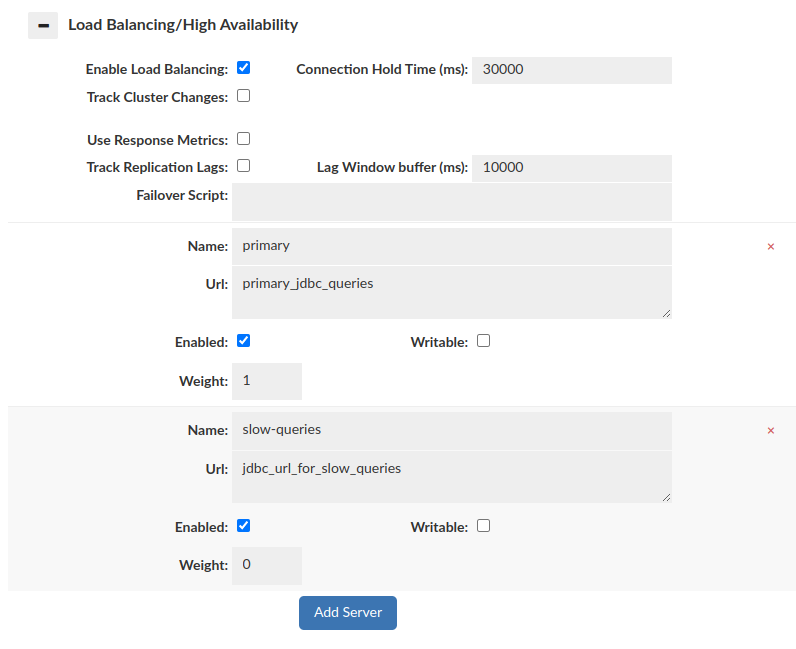
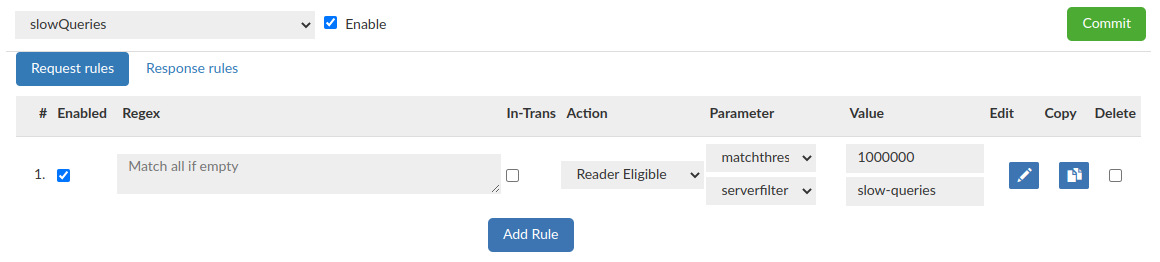
Configuring data source and rules in a proper way allows us to forward slow queries to another data source to avoid database performance drop. If average runtime will be longer than given 'matchthreshold', then query will be forwarded to data source defined by 'serverfilter'.
Data Source configuration:
Rules configuration:
Request Rules
Request rules can be seen in Request Rules
Response Rules
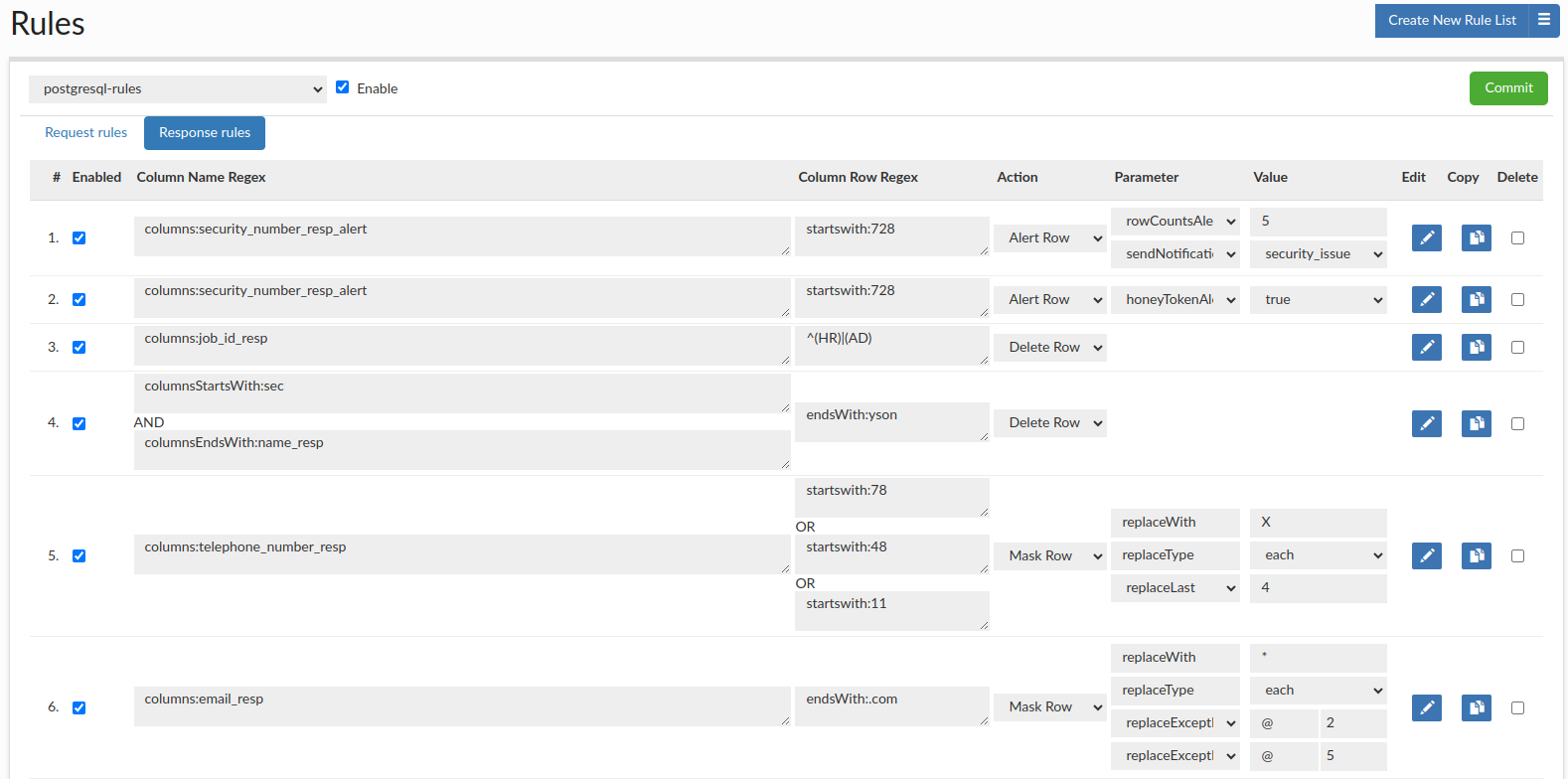
In the Response Rule tab, we can define actions that will be processed for responses. The rule consists of several elements:
- #: A current row indicator (for moving rows) and the index of the rule.
- Enabled: If the rule is enabled. Non-enabled rules will not be processed.
- Notes Indicator: When a note is attached to a rule, an icon will be visible, and the note can be viewed by hovering the mouse over the icon
- Column Name Regex: Specify the column name regular expression to match with. See column name regexes below for more information.
- Column Row Regex: Specify the column row regular expression to match with. See column row regex below for more information.
- Action: What action should be taken on a regex match.
- Parameter: A parameter that modifies the behavior of the action.
- Value: The value of the parameter, e.g. to specify the replace string for a masking rule.
- Edit: An icon to provide an expanded view of the rule, and to allow editing of comments.
- Copy: Allows to copy chosen rule.
- Delete: Toggle deletion of a rule on the next commit.
To re-order a rule, it can simply be dragged into place in the desired order.
If there is a row of data where more than one rule tries to perform the same operation (e.g. two or more alerts or masking, tokenization), only the last rule will be applied. It is especially important with choosing the sendNotification, and the source for tokenization rules, as it can save the tokens in the different database than expected. It still allows for masking and alerting on the same field as well as applying the same rule to different columns in the same row.
Response rules are also applied to metadata retrieval.
Hint: To better edit a rule, make sure to use the pencil icon to open up the expanded window, which provides more editing options.
Column Name Regex Behavior
Defines the column name expression to match.
Examples of specifiers that can be used :
- tables:{table1},{table2}..., to match all column names from table.
- columns:{column1},{column2}..., to match any column name literal in a list.
- columnsStartsWith:{column1},{column2}..., to match any column names that starts with any string in the list.
- columnsEndsWith:{column1},{column2}..., to match any column names that ends with any string in the list.
- columnsExist:{column1},{column2}..., to match all column names that are in the query, if at least one column name will match. (ex. If "select col1, col2 from table" is the query, and columnsExist:col1 is the rule, it will apply logic for both col1, col2)
- columnsNotExist:{column1},{column2}..., to match all column names that are in the query, if specified column will NOT occur in the query. (ex. If "select col1, col2 from table" is the query, and columnsNotExist:col3 is the rule, it will apply desire logic for both col1, col2)
Column Row Regex Behavior
Defines the column row expression to match.
Each column row regex field can contain either a re2j 1.1 (https://github.com/google/re2j) regular expression, or an extended specifier (below). The re2j regular expression language is nearly identical to normal Java regular expressions, except that it can operate in linear time, while Java regular expressions may end up being unbounded in time. As a tradeoff, certain features dependent on backtracking are removed.
Examples of some addition to regular expressions, the following extended specifiers can be used instead:
- literal:{rowData1},{rowData2}..., to match any column row literal in a list.
- startswith:{rowData1},{rowData2}..., to match any column row that starts with any of the given string.
- endswith:{rowData1},{rowData2}..., to match any column row that ends with any of the given string.
- notMatch:{rowData1},{rowData2}..., to exclude any column row that matches any of the given string.
Response Rule Action Details
Parameters of each rule type can be chained, editing is required to add more than one parameter. In a masking and tokenization rules the order of processing is the same as the order of the printed parameter options.
An option to send notifications can be added to each response rule, which will be sent if the rule is triggered. It is recommended to utilize the 'Edit' button to associate the 'sendNotification' rule with an existing alert rule. Sent email will contain details, and its subject will be dynamically set as your vdb name that generated this alert. Before using this feature, client has to previously define Notification entry in the Admin -> Notification tab. More information about Notification system is available here If multiple sendNotification rules specify different notification recipients, the last applicable rule takes precedence.
Response rules options can be found in response rules
Tokenizing
Tokenization replaces sensitive values in query results with reversible, format-preserving tokens stored in a dedicated token store (database table). Unlike masking, tokenization enables consistent references to the same sensitive value across queries, sessions, and users—without exposing the original data.
Why use Tokenization?
- Format Preservation: Tokens maintain the data type and general structure of the original data (e.g., a tokenized email will still look like a valid email address). This prevents downstream application validation errors.
- Analytics Support: Unlike simple Masking (which might replace everything with
*****), Tokenization allows you to perform analytics likeGROUP BYorJOINon sensitive columns without ever exposing the real data. - Performance Note: Because tokenization involves reading from and writing to a database table ("token store"), there is a performance overhead compared to standard in-memory masking.
How it works:
When a response rule triggers tokenization, Heimdall follows this logic:
- Lookup: It checks the configured token store database to see if this specific sensitive value has been tokenized before.
- Found: If a token exists, the existing token is returned. This ensures the same sensitive value (e.g., "John Doe") always resolves to the same token (e.g., "Hybd Kfs") across different queries and user sessions.
- Not Found: If the value is new, Heimdall generates a new unique token that mimics the format of the original data and stores this pair in the token table for future use.
Tokenize Actions
Tokenize rule action and its parameters can be found in response rules
To properly initialize the configuration required for utilizing the tokenization feature, users are advised to execute the provided SQL script, "create-token-table.sql", accessible via the DataSource GUI button. The masking and data tokenization feature works fully in proxy mode (In the SQLServer this feature supports only numeric and string values - excluding uniqueidentifier type). In JDBC mode (e.g. oracle) will only work for String values.
For tokenization to work, a data source will need to be specified to store the original value, and the tokenized value, allowing the original value to be retrieved if needed.
Before using the tokenization feature, please contact Heimdall support, to adjust the setup with specific requirements, helping to avoid potential slowdowns in performance.
When configuring masking and tokenization for a same column, only the masking will be performed.
Additional examples of using response rules
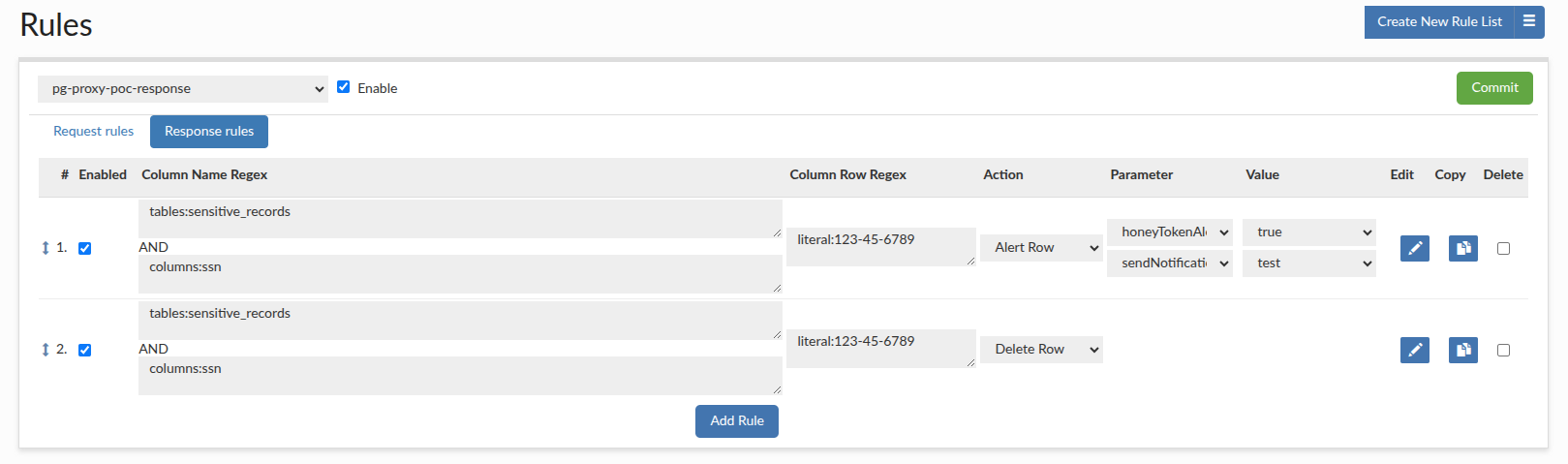
Create two rules, one for the "honey token" alert and one for delete row that will delete that honey token, so that the final user only sees the alert but not the "honey token" data. The number of rows and their size would be computed after that operation, so from the perspective of the user (who doesn't have access to the HeimdallData Centrall Management console ) they wouldn't know that any "honey token" was queried.
When working with application like DBeaver, we need to load a lot of data at startup, including all the tables, even if we need only a few of them. We can use Delete Row rule, to edit the metadata results from information schema so that all unnecessary tables/partitions are removed from the metadata, greatly reducing amount of data load to DBeaver, and improving boot time for users.
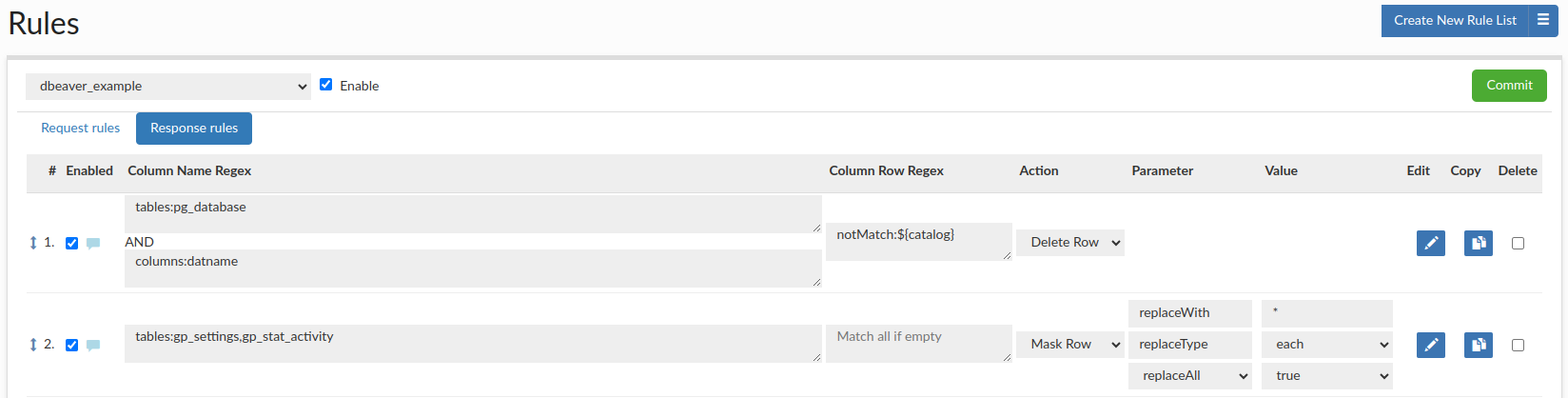
For example, you can create a response rule configuration, where the first rule has the 'Delete Row' action using 'Column Name Regex' as 'tables:pg_database' & 'columns:datname' and using 'Column Row Regex' as 'notMatch:${catalog}' to delete all rows except those containing the database you are connecting, so on initial connection all databases except ${catalog} will be hidden. The second rule has the 'Mask Row' action using 'Column Name Regex' as 'tables:gp_settings,gp_stat_activity' and replace with * each character of data, so all data in both tables will be masked.
Honey Token Configuration and Implementation Guide
A "honey token" is a decoy data record strategically placed in your database. Its purpose is to act as a tripwire; it is data that no legitimate user or application should ever query. When a query accesses this specific honey token, it triggers an alert, signaling a potential security breach, unauthorized data exploration, or a compromised account.
The effective implementation of honey token detection involves two distinct but related rules:
- An Alert Row Rule: To detect when the honey token is accessed and notify administrators.
- A Deletion Row Rule: (Optional) To remove the honey token from the query's result set, preventing the unauthorized user from knowing they have been detected.
Implementation Steps
Prerequisite: You must have already inserted the honey token data into your database. For example, a fake user record or a fictitious high-value transaction.
Step 1: Create the Honey Token Alert Rule
This rule will identify the query for the honey token and trigger a notification.
- Create a Response Rule entry.
- Column Name Regex: Specify the table and column where the honey token resides. Example:
tables:sensitive_records, columns:ssn - Column Row Regex: Specify the exact value of your honey token. The literal specifier is ideal for this. Example:
literal:123-45-6789 - Action: Select
Alert Row. - Parameter & Value: Select
honeyTokenAlert. To receive an email notification, add thesendNotificationparameter and select your pre-configured notification channel as the value.
Step 2 (Optional): Create the Honey Token Deletion Rule
This rule will remove the honey token row from the result set returned to the user.
- Create another new Response Rule entry by clicking 'duplicate' on the previously created alert rule.
- Action: Select
Delete Row.
With this configuration, if a user runs SELECT * FROM sensitive_records; (which includes our ssn 123-45-6789), the system will:
- Match Rule 1, triggering a
honeyTokenAlertand sending an email to a notification group. - Match Rule 2, deleting the row from the results. Also, adjusting the number of rows returned to the user, and the data size, so it's basically undetectable.
- Sends email notification to a configured group of recipients.
- Return a result set without a honey token to the user (if configured with the deleteRow action).
The final effect is a silent alarm. The administrators are notified of suspicious activity.
Example configuration: