Data Source Overview
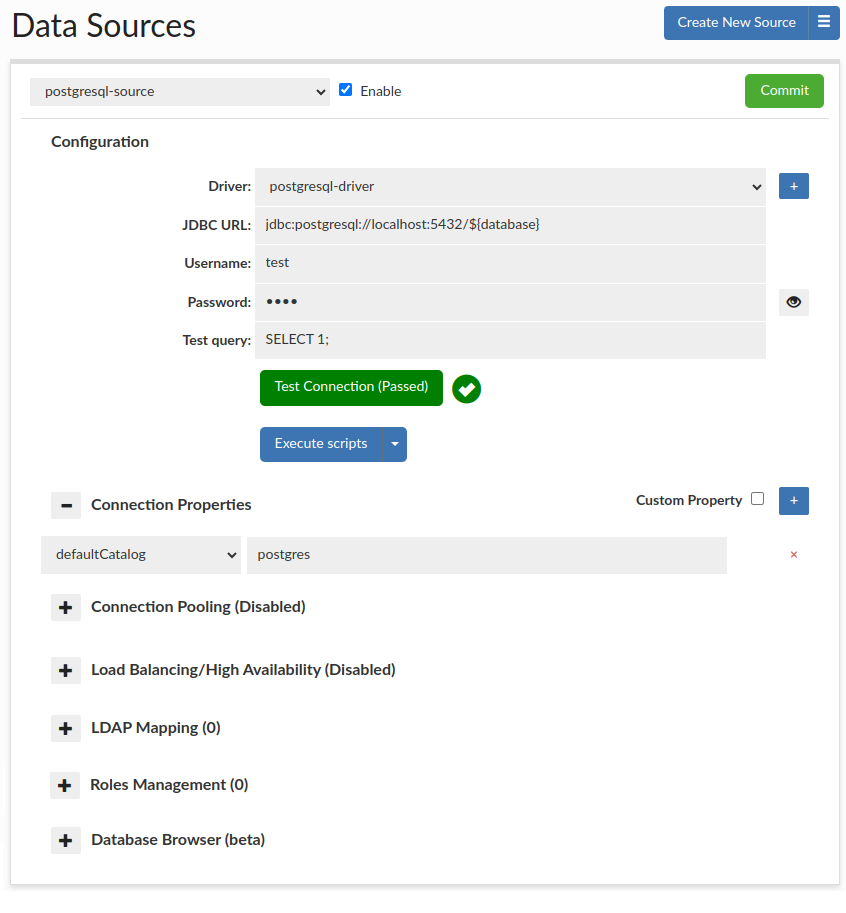
A data source represents access via JDBC to a back-end database server. Each VDB definition must have at least one default data source associated with it, which will be used if no policy dictates what database should receive a query. Source configuration includes the connection properties, connection pooling, and Load balancing and cluster management characteristics.
The driver field allows either a new or existing JDBC driver to be specified. Heimdall comes with a small library of JDBC drivers that it has been tested with, but other drivers can be configured in the driver tab as needed. When using the proxy functionality of a VDB, the tested drivers should in general be used, as some internal and version specific features of a driver are often used by the proxy to provide compatibility with the binary layer translation that occurs.
The JDBC URL configuration will normally be build through the configuration wizard, or can be copied from an existing JDBC application. Properties on the JDBC URL can be moved to the name-value list in the connection properties, OR can remain in the JDBC URL–either works, although using the name-value list provides an easier to view list vs. a long URL. When internally doing database type detection, the JDBC url is also used to determine what type of database is in place, for per-database behavior adjustments. When using load balancing, this URL is not in general used, with one major exception--when using the hdUsePgNotify option, this will be the target used for notifications. This is necessary as Postgres notifications will not be shared between nodes, and as such this should point to a single name that resolves to a single target database.
The data source username and password are used for several purposes:
- For health checking the data source;
- When performing lag detection, to write to and read from the Heimdall schema;
- When doing cluster detection, reading cluster variables as appropriate, or when Heimdall needs to extract metadata for other purposes;
- When no user or password is specified in JDBC mode, this user will be used to connect to the database;
- In proxy mode, if proxy authentication is not provided. In this case, any user can connect, but the DB connection will be made with these credentials.
In some cases, it is necessary to specify various parameters in a dynamic way, i.e. with the Odoo application, it changes the active database at runtime, and connects to the desired database as desired. To support this, fill in the following values as necessary:
- ${catalog} or ${database} to specify the name of the database (either will work), use "defaultCatalog" connection property to set this for health checks and sql auth purposes
- ${schema} for the specified schema
- ${user} for the connection user
- ${password} for the password specified on connect (only for Postgres, Redshift and SQL Server)
- ${host} for the hostname provided when using SQL or secret based authentication, use the "defaultHost" to provide a default value when it is not provided, i.e. for health checks and sql auth purposes (to host the mapping table)
- ${application_name} for the application name provided on connect
The test query option is used in a variety of situations, including health checks, and verifying that a connection is still viable after an exception. It is also used in a variety of conditions when pooling is configured, in order to validate the connection while idle, etc.
To validate that the options appear valid, please use the Test Connection button. This will initiate a connection through the vendor driver by the Heimdall management server, and acts as a general guide if the configuration appears valid. It is not a guarantee that under all conditions it is valid, however.
Scripts
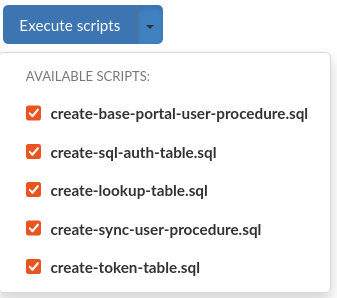
To automatically execute a set of SQL scripts on the data source, use the Execute scripts button. This will attempt to execute selected scripts located in /config/scripts in the Heimdall installation directory.
Scripts are grouped by database type into directories. Predefined files are supplied at Heimdall startup to these directories, these use the "heimdall" schema by default, but if you choose to use a different one, it's existence must be ensured.
You can modify them or create Your own to be able to execute them via GUI, but it is advised to do so in separate files, named differently than the default ones, otherwise these might get overridden at startup.
If Heimdall was recently updated, on first start there will be a backup of previous version of /config/scripts directory created.
Connection properties

Connection properties are database and driver specific. When in proxy mode, a default set of properties will be inherited by the source in order to provide compatibility with the proxy mode used. In JDBC cases, no default properties will be set by Heimdall. When using a known driver, all supported connection properties will be provided in a drop-down list, and tool-tip help provided for each one when selected. When using an unknown driver, the property name field will allow an arbitrary name to be specified and value provided, as per your JDBC driver's documentation.
In order to add a custom property (in the event it isn't in the drop-down list), you can use the custom property checkbox next to the blue plus, to provide a free-form field.
Connection properties list can be seen in connection properties
Please see the UI for a more complete list, including vendor options, as the drop-down list provides context-sensitive help on each option provided.
Lists of connection properties for given databases can be found under: Options → Connection Properties. E.g. MySQL connection properties
Connection Pooling

The pooling section controls if connection pooling (the reuse of back-end connections for many front-side connections) is used internally to Heimdall, and if so, what the connection pooling properties are. Heimdall implements a variant of the Tomcat connection pool, and where appropriate uses the same properties for configuration.
The primary difference between the Heimdall and Tomcat connection pool is that the Heimdall pool implements it as a "pool of pools" where each user/database (catalog) combination becomes a pool within the connection pool, but overall resources are constrained by the overall maxActive option, which dictates the overall number of busy AND idle connections that can be established to the data source. Additional properties of maxUserActive and maxUserIdle dictate how many active (busy+idle) and idle connections are allowed on a per-catalog+user combination. This provides much more granular control over the behavior of the connection pool when many databases and users are connecting to the database server.
idleSessionTimeout note
If the database has configured a type of idleTimeout (currently supported: idleSessionTimeout for postgres(version 14+), wait_timeout for mysql) if the value is detected sessions in idle pool will be deleted with an increasing chance in time based on idleTimeout, it is done to prevent having closed connections in the idle pool. If connections are not deleted fast enough consider changing the timeBetweenEvictionRunsMillis pool property.
The properties section provides a drop-down list of the available properties, and tool-tip help for them. The available properties can be found here: pool properties
For additional information about each pool parameter, please see the Tomcat pool attributes page (https://tomcat.apache.org/tomcat-9.0-doc/jdbc-pool.html#Attributes).
Warning: Not all applications will be compatible with connection pooling. If issues are observed in initial application testing, it is recommended that disabling connection pooling be performed in order to isolate if this feature is triggering undesirable behaviors in the application. If using the connection pooling, the default number of connections is set to 1000. To adjust this, change the “maxActive” setting to the desired number of connections.
Connection Pooling options
There are commands specific for connection pooling such as show pools and clear pool described in the Inline commands section.
Postgres only: There is an option to clear a pool when making a connection to it is impossible due to the pool already being at maximum capacity. Please see Clear pool option.
Load balancing and High Availability
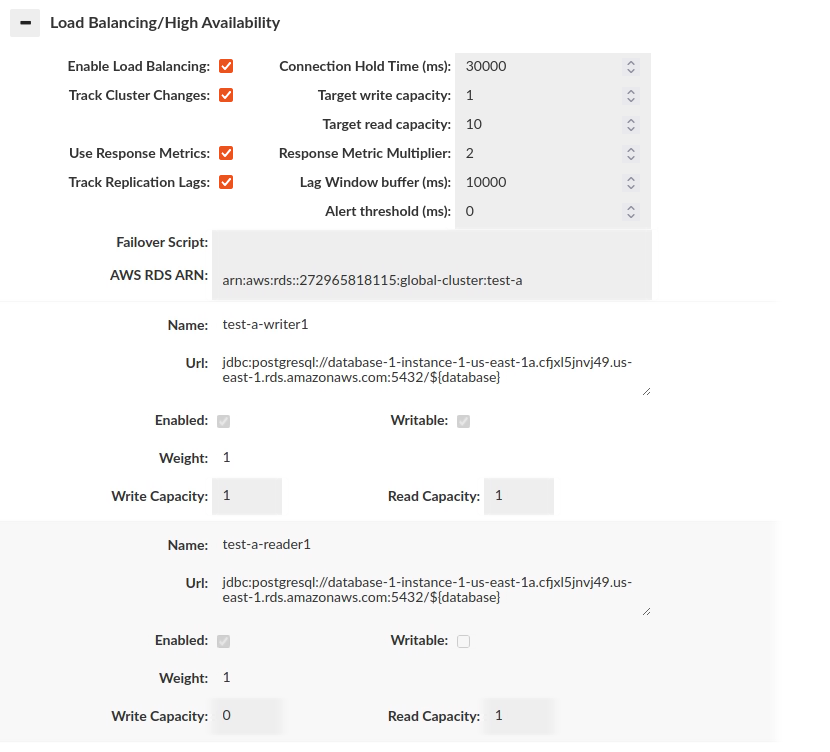
Due to the complexity of this topic and how the options interact with other subsystems, please see the help section dedicated to Load Balancing for more details.
Group Mapping
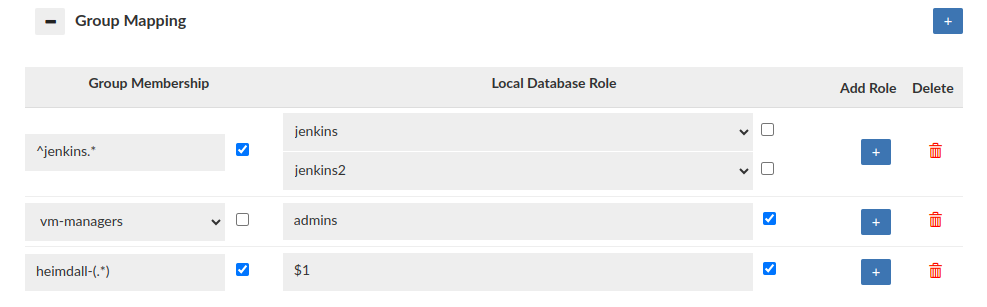
The Group Mapping feature provides a flexible approach to associate a group (e.g. LDAP) with specific database roles. In the absence of group mapping, Heimdall defaults to mapping groups to roles with identical names. This option applies when the heimdall sync_user script is used with LDAP authentication. Group mapping will also be triggered when user session is created via portal. Users can configure group extraction based on the group regex when the "Use Regex" checkbox is enabled, if checkbox is disabled, none of the regexes will be applied to the mapping. Heimdall supports the use of capture groups within regex patterns. This enables the extraction of specific substrings from group names for role mapping. For example, if configured as on the screen, the 'heimdall-admin' group will be mapped to the role '${1}' which leads to 'admin' substring. When no mapping is configured, this option can be used as "deleting" group.
The Group Mapping feature also affects the roles that are granted to the user after successful authentication in the synchronization process, via Ldap Auth, Kerberos + Ldap, SQL Driven Auth / Secrets Manager Auth. For managers, Group Mapping also governs the roles requested via the portal, such as when using SAML authentication with group extraction or any other authentication method that results in group extraction.
⚠️ Note: During LDAP group extraction, the Roles Management rules will apply, filtering out any roles that require approvals greater than 0 or are not configured.
Roles Management
-
Database-Native Session Cleanup: By default, the Central Manager (CM) is responsible for clearing ephemeral user sessions. If an ephemeral user session ends (due to expiration, cancellation, or termination) when the CM is offline, the session will not be immediately cleared. In this situation, the ephemeral user will not be locked, any active connections for that user will not be closed, and the user will not be dropped from the database. As a result, the user will still be able to access database resources until the CM is back online and performs its normal cleanup tasks.
When this option is enabled and a session ends, the ephemeral user will be locked, which will block any new logins. In MySQL and Oracle, all active connections for that user will also be forcibly closed. This ensures the user will be unable to perform any operations on the database after the session ends, even when the CM is offline, because the cleanup relies on the database’s native mechanisms rather than the CM. The specific mechanism used will depend on the database type.
- MySQL - Requires the MySQL Event Scheduler and procedure called create-clear-session-user-procedure.sql. Click here, to see how to set up event scheduler in AWS.
- Oracle - Requires the Oracle DBMS Scheduler and procedure called create-clear-session-user-procedure.sql. Click here, to see what is required to schedule jobs in Oracle.
- PostgreSQL - the VALID UNTIL clause is used on user creation. From the documentation: "The VALID UNTIL clause sets a date and time after which the role's password is no longer valid." This means that after the session ends, new login attempts are blocked, while existing connections remain active until closed.
- Redshift - the VALID UNTIL clause is used on user creation. From the documentation: "The VALID UNTIL option sets an absolute time after which the user's password is no longer valid. By default the password has no time limit." This means that after the session ends, new login attempts are blocked, while existing connections remain active until closed.
- Greenplum - the VALID UNTIL is used on user creation, but it looks like it is not working as expected.
- SQLServer - currently not supported.
Note: The following actions will still be performed only after the CM returns online: running the Inherit Objects process and dropping the ephemeral user.
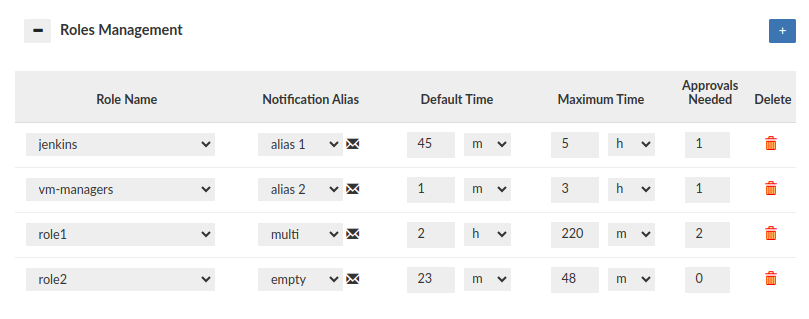
The role configuration options can be found here: roles management
Warning: This feature is NOT functional when using MySQL with version < 8.0 and PostgreSQL with version < 11.0.
The Roles Management section impacts also proxy authentication process i.e. what database roles can be granted for successfully authenticated user. To allow the role to be granted Approvals Needed must be set to 0. A role whose configuration is not created at all will not be granted to the user during synchronization (Synchronize DB Authentication), even if the user is a member of such group in LDAP Server! For example: User authenticates via LDAP and 3 groups are extracted: myrole, myrole2 and myrole3. If configured as on the screen above, only the myrole3 will be granted to the user.
Roles Management (Portal Mode disabled)
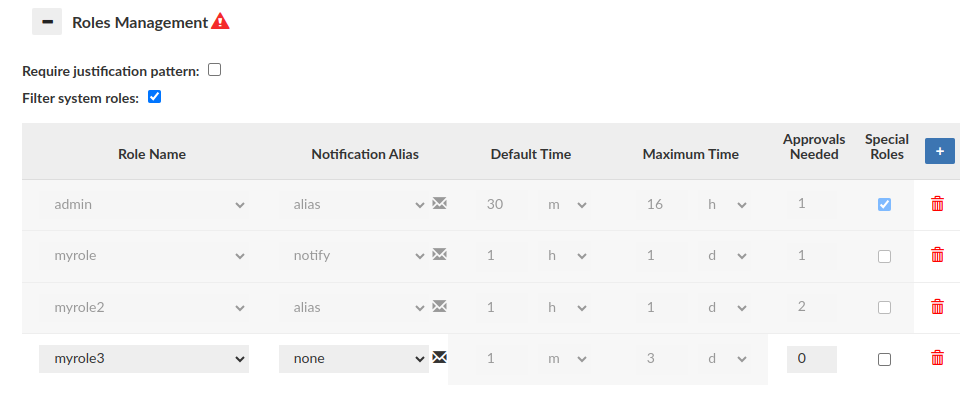
When Portal Mode is disabled, the main functionality of this section is limited. However, it is still possible to create a role config without the necessary approvals (Notification alias 'none' type required).
Database Browser
The Database Browser is a versatile tool designed for viewing database structures and modifying permissions. Click here for more information.
Access Reports
-
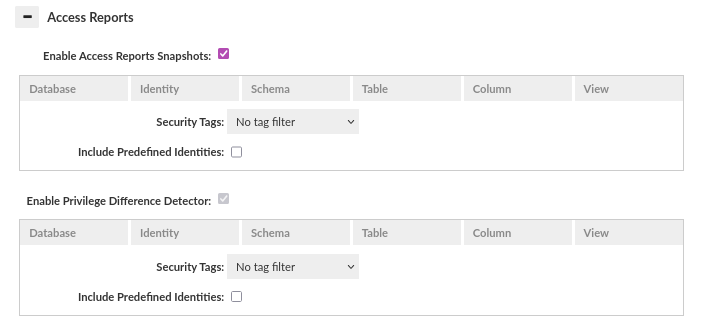
Enable Access Reports Snapshots: helps to keep an audit trail by generating periodic access report snapshots. If it is enabled, the global scheduler runs for this source. More information here.
-
Enable Privilege Difference Detector: helps identify what permission changed, when it changed, and potentially who may have made the change. When enabled, the global scheduler runs for this source. More information here.
-
Filters: In both cases, it is possible to provide optional filters that work in the same way as those from Database Browser. However, unlike the filters in Database Browser, these filters are persisted once set and can be updated or committed as part of the configuration. When filters are provided, they determine the scope of data used to generate the access report for that source. Only the data matching the filter criteria is included. If no filters are defined for a source, the access report is generated based on all available data we support in that source. What data we support is described here.
Secrets Manager
The username and password can be stored in the Secrets Manager.
These credentials are cached on both manager and proxy instances. This configuration supports automatic refreshing of these values in case a rotation happens. This is done only when the connection fails due to the cached credentials being out of date and authentication error happening on the data source.
Furthermore, in instances where a health check is configured and fails, such as during password rotation, the system will attempt to retrieve updated credentials from Secrets Manager as well. In the event of a proxy-induced change to the username and password, users are advised to refresh the DataSource page to view the newly uploaded credentials.
Kerberos Authentication
To enable Kerberos authentication for your database connection, check the 'Kerberos' box and provide the username along with the keytab location. If keytab location is empty, the default location is /etc/krb5.keytab.
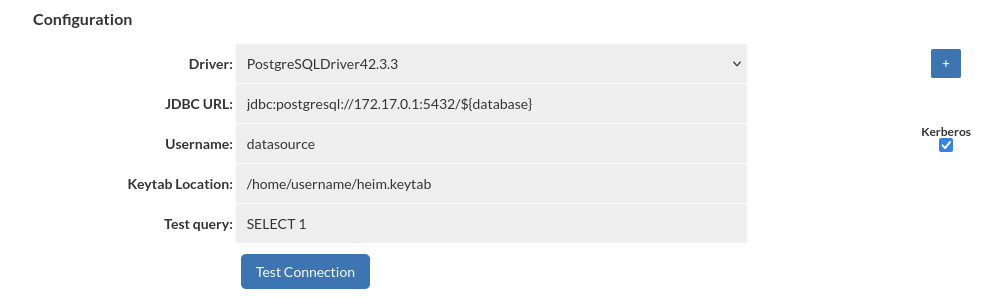
Kerberos authentication will be applied only for username specified in DataSource configuration. All other users will authenticate with username and password. This feature is available only for PostgreSQL and SQL Server databases.
Important: Ensure the keytab file, which contains the specified user credentials, is located on both the Central Manager server and any proxy servers associated with the data source.
Configuring Trigger Based Invalidation
In order to support out-of-band data ingestion into the database, a data source can be configured for "Trigger based invalidation". There are several options available on the data source for this configuration:
- dbTriggerTracking: set to true if this feature is to be enabled
- dbTimeMs: A query to retrieve the current time in MS on the database, to insure timestamps are synchronized
- dbChanges: A query to retrieve a timestamp (as a long) and table name (as a string), for the last invalidation time of that table.
The dbTimeMs call for example defaults to the value of "SELECT heimdall.get_time_ms()", usable on MySQL without any changes. The dbChanges call defaults to {CALL heimdall.changes(@ts)}. This can be a stored procedure. The string "@ts" will be replaced automatically with the last modification (per the DB time) that has been observed, so can be used to pull only the tables that have been modified since the last invalidation observed. The table name returned needs to be fully qualified, as observed with the "printTables" option for the rules, as this is the table name we will be comparing for invalidation purposes.